
WebUI
LivingMemory uses AstrBot official Plugin Views (Pages in older releases) for its dashboard. No extra web server is required.
Entry
Open AstrBot WebUI:
Plugins -> LivingMemory -> Views -> dashboard (Pages in older AstrBot releases)
AstrBot 4.24.2 or later is recommended. Older versions can still run the plugin, but the dashboard may be unavailable.
Settings
- The page opens with eight common settings; the rest is folded into five categories (memory generation and lifecycle, recall and tools, graph and atoms, access and isolation, system and maintenance) that can be searched, expanded or collapsed all at once. Field labels and hints come from the plugin schema and follow the dashboard language.
- Saving writes to the plugin configuration. Options used during initialization take full effect after reloading the plugin, while some (such as write-time duplicate merging) apply immediately.
- The AstrBot plugin config page keeps the model providers, reply language and the required Embedding Provider field.
Dashboard areas
| Area | Purpose |
|---|---|
| Memory management | Inspect and filter memories; edit summaries, topics, key facts, status, and importance; batch-delete; import and export |
| Recall debugging | Enter a query and inspect results, final scores, and the retrieval routes that matched |
| Graph view | Browse entities, relationships, and memory connections |
| System status | Review active, archived, and deleted counts plus graph, atom, importance, and session statistics (sessions ordered by memory count); the consolidation panel carries the run action, and backups are newest first |
| Prompt management | Browse prompts by category, edit overrides, identify customized templates, and restore or load defaults |
Appearance
Open Appearance using the palette icon at the bottom of the sidebar (in the bottom navigation on mobile). Four visual styles apply immediately:
| Style | Design |
|---|---|
| Editorial | The original green grid, bold headlines and crisp lines |
| Studio | Indigo accents, rounded floating cards and horizontal graph metrics |
| Paper | Warm paper surfaces, serif headings, double rules and reading space |
| Terminal | Monospace type, cyan accents, sharp borders and graph metrics on the right |
Each style supports Light, Dark and Auto. Auto follows AstrBot, or your device when opened independently. An explicit color mode is not overridden by AstrBot. Preferences are saved in the current browser and survive reloads; when local storage is blocked, they apply only for the current visit. Options support keyboard selection; press Escape to close.
Memory details and lifecycle
The memory page follows filter → select → act. Keyword and session inputs filter automatically; Enter or Filter applies all current controls immediately. Reset filters clears the criteria. Page size lives beside pagination, and Refresh is at the top right. Batch actions appear after selecting rows on the current page, with a Clear selection action.
Import and export live in a separate collapsible area with an explicit export scope: selected rows when a selection exists, otherwise all memories regardless of list filters. Import progresses through reading, preview, confirmation and writing, with visible feedback at each step; empty previews never proceed to a write. Related controls and page switching remain locked during bulk operations and transfers to prevent duplicate submissions or changing the operation's scope.
- Editing a summary, topic, or key fact rebuilds that memory's embedding, BM25, graph, atom, and related derived data. Status-only or importance-only edits do not unconditionally rebuild every index.
- Each memory labels its writer below the summary: Agent-written, imported, or re-summarized; unmarked memories come from auto-summarization. Summaries judged low quality are marked separately. The detail panel shows the same origin, the reason an agent recorded the memory, and the previous ID after a content edit changes it.
- Memories above the source-retention threshold show source messages in the detail panel, collapsed by default and marked where the assistant spoke. When at least two source messages are available, the Dashboard can call the LLM to replace the memory with a new summary.
- Changing status to
archivedremoves a memory from normal recall indexes while retaining its source document. Changing it back toactiveregenerates its embedding and derived indexes. - Selection checkboxes support batch deletion from the current list. Export includes only selected memories when a selection exists.
WARNING
Deletion is permanent. Archive memories that may need to be restored later. Restoration requires a working embedding provider.
Prompt management
The prompt page shows each template's purpose, variables, and default or customized state; templates that must emit JSON carry a JSON badge next to the name, with the constraint on hover. The editor can save an override, load default content for further editing, or remove an override and restore the built-in default; Load default content only appears for templates that are already customized. Templates marked as JSON must remain valid JSON or saving is rejected.
Prompt overrides live in the plugin data directory and do not modify repository templates, so they remain in place across plugin upgrades.
Memory and prompt editors ask how to handle unsaved changes before closing, cancelling or switching pages. Keep editing retains the draft; Discard changes exits. Load default content only fills the prompt editor until Save is clicked. The editor cannot switch to a different prompt while saving.
Recall supports Ctrl / Cmd + Enter. Each result shows the fused final score plus the per-route scores of the retrieval routes that actually matched (document keyword, document vector, graph keyword, graph vector), so you can tell which path recalled a memory. The result header echoes the k and session filter that produced it. A new request clears previous results and displays failures explicitly, so old cards cannot be mistaken for the new query's output. The graph toolbar pairs the search box with its action; the session scope input offers suggestions from the current session statistics and applies on Enter or by pressing Full Graph again. Both work on mobile.
What the graph view is good for
Use the selector at the top of the graph page to switch from the default 2D Plane to 3D Space. The independent warm-lit 3D scene hides the page heading and statistics. Left-drag or use one finger to rotate, right-drag to pan, and scroll or pinch to zoom. Clicking a node smoothly moves the camera closer and opens its memories. Click the background to restore the previous view; Reset view fits the whole graph. Switching dimensions preserves the data and selection. An independent three-dimensional layout places the nodes; positions do not represent semantic distance and are never saved to memory data.
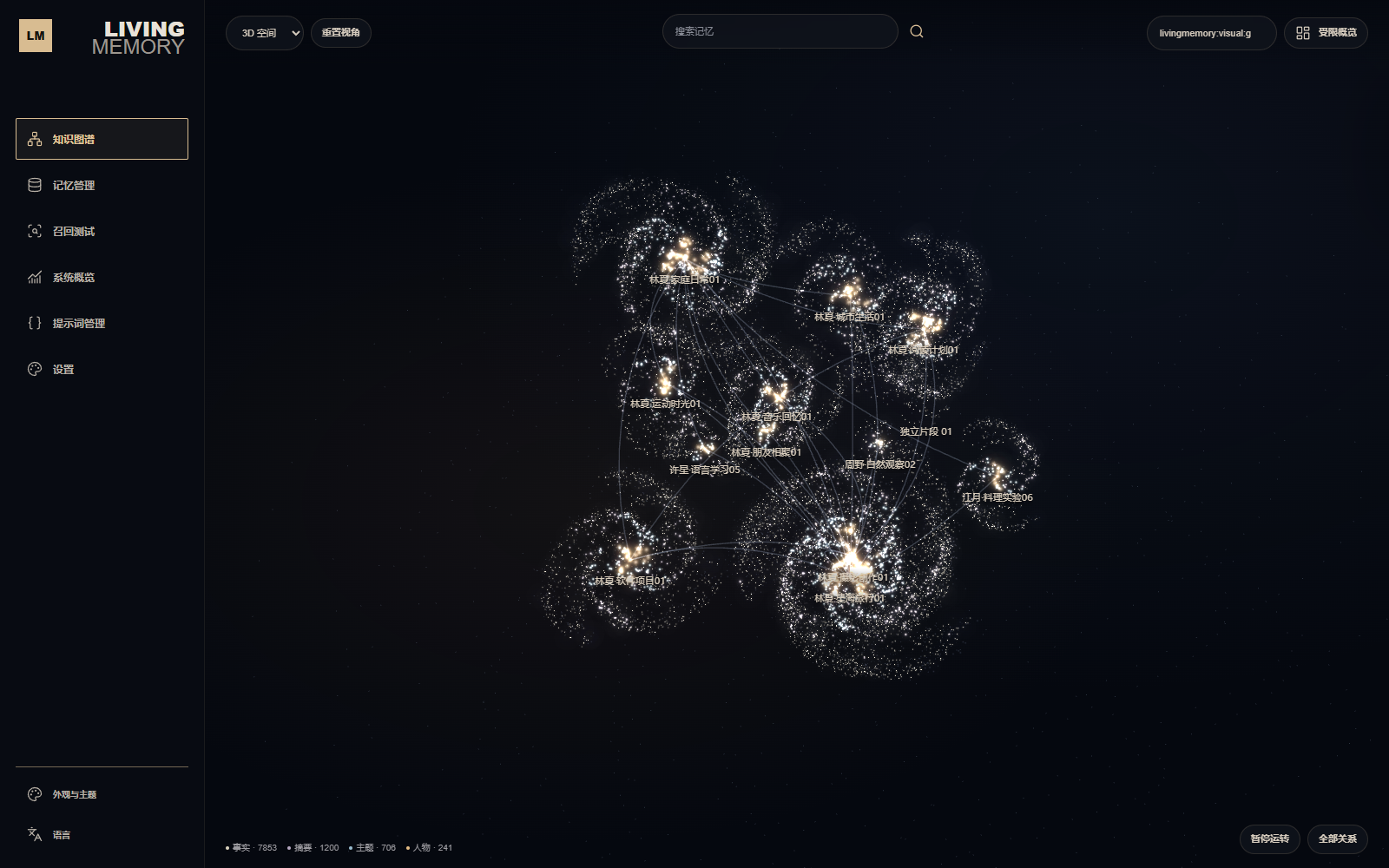
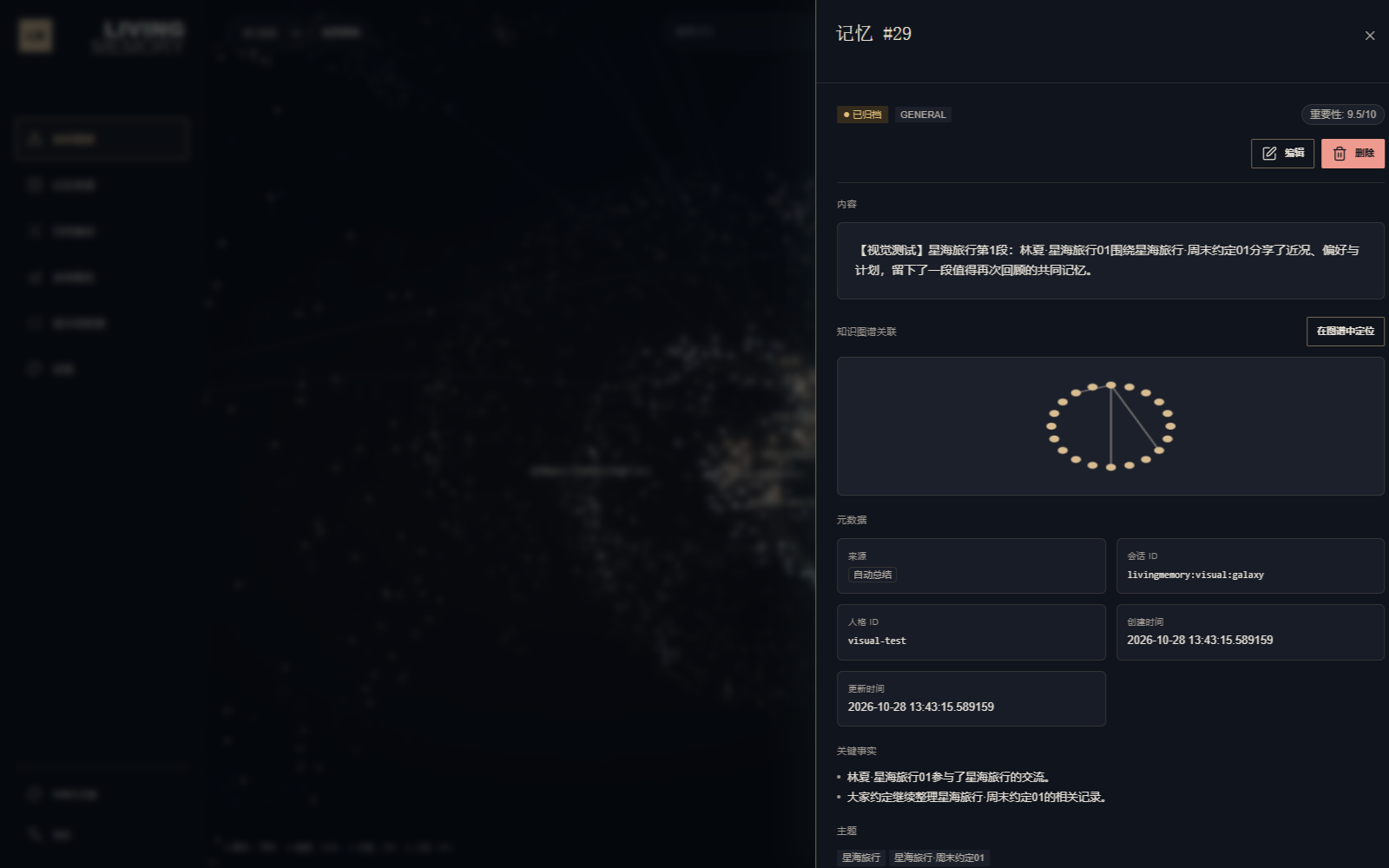
The 3D scene, node panel and full memory detail share one dark palette so content, metadata, editing fields and the mini graph remain readable. Returning to 2D or another page restores the previously selected appearance and color mode.
The 3D overview displays a small set of community curves. Moving closer reveals internal structure, while hover or selection highlights direct relationships. All relations toggles the complete set of links. A separate Worker computes the initial layout, distributing large communities along thick spiral arms and smaller communities or isolates as stellar clusters. Animation preserves this shape, combining slow system rotation with bounded local gravity near semantic branches.
Gravity uses normalized masses assigned by node type and a softened center. Community anchors stay fixed; each node evaluates only its assigned center, so per-frame work grows linearly with node count. All indexed relations share the node position buffer and remain rendered in GPU batches.
3D uses weighted Louvain communities within the selected scope, placing their centers in three dimensions according to actual cross-community relationship strength. Isolated nodes share a separate compact cluster. Depth remains visible when paused. People, topics, summaries and facts have different sizes. The overview reduces cross-community links; selecting a node or toggling All relations still exposes complete connections. Overview and selected relations are brighter, with full-relation opacity adjusted to graph density.
Community representatives stay fixed as stellar anchors. Topics prefer the most strongly connected person, and summaries prefer topics. Relationship and preference facts prefer people; other facts prefer related summaries or topics. Nodes without a suitable connected parent use their community representative. Branches spread within the radial ranges of their terminal descendants, which fill continuous space rather than a narrow shell. Motion affects display positions only and never adds or changes memory relations.
Pause motion / Resume motion controls continuous animation. Hovering or focusing holds the target and its ancestry and pauses its system's bulk rotation; other systems keep moving. Released objects retain their saved position and velocity. Computation and rendering stop when leaving the graph page or hiding the browser tab. The system's reduced-motion preference starts the view paused, with the button allowing an explicit opt-in.
Representative stars have an outer corona. Each source memory rated at least 8/10 prefers a summary node for its pulsing halo and rotating beams, using a fact when no summary exists; entity connection counts do not determine memory value. Star dust provides background density and never participates in counts, picking or retrieval. Overview rotation uses the community-weighted center; focus rotation uses the actual node or selected-memory-node center. Projection offsets reserve room for details without moving the rotation pivot. Pausing motion also pauses corona and pulsar time.
For development, append visual fixtures to an initialized plugin data directory. The command below defaults to 10,000 nodes, 200,000 relations and 1,200 archived synthetic memories, including varied thematic groups, weak bridges and isolates; no embeddings are generated. Reload the plugin and hard-refresh, select livingmemory:visual:galaxy in the session field, then load Full graph. Existing records remain intact; running the script again appends another fixture.
python scripts/seed_visual_graph.py --data-dir "<plugin_data_dir>"| Observation | Example |
|---|---|
| High-frequency entities | Users, projects, places, group topics |
| Stable relationships | "A person likes something", "a project depends on a technology" |
| Cross-memory links | The same entity appearing across multiple conversations |
| Aging risk | Low-importance relationships that have not been accessed for a long time |
TIP
The graph page shows a constrained subgraph of recent memories by default (node/edge caps apply). Full Graph loads all nodes, relations and associated memories in the selected session and persona scope. Full requests no longer truncate at fixed counts; the current display level controls how many links are visible in 3D.
In 2.7.0-beta.1, zoomed reading, hover and node selection pause ambient movement and stabilize label priority and collision bounds. Settled reading stops idle drawing; overview motion resumes when zoomed out with no hover or selection. Lower-priority labels may be omitted when space is limited; select a node to read its full details.
Selecting a node lists the memories it connects to, and any of them opens its memory detail directly. Node details on the graph page are not modal, so you can select several nodes in a row to compare them. The reverse path exists too: the Knowledge Graph Context section of a memory detail offers Locate in graph, which switches to the graph page and focuses that memory's subgraph without typing an ID.
TIP
Dashboard operations reuse the plugin runtime MemoryEngine and GraphStore, so they do not bypass backend data safety logic.
Background index checks and large rebuild progress are currently exposed through /lmem status. See Commands for states and recovery guidance.
Memory migration
The memory page supports JSON and CSV:
- Export downloads all memories when nothing is selected, or only the selected rows otherwise.
- Native JSON round-trips summaries, scopes, personas, structured metadata, and retained source messages.
- External JSON may use
content,text,summary, ormemoryfor summary text. Collections may usememories,long_term_memories,short_term_memories, or conversation maps keyed by session ID. - Import always runs a preview first. By default it skips duplicates using summary content + session ID + persona ID; duplicates can be explicitly allowed.
- A source-only conversation without a summary makes one LLM call per imported item. Successful imports use the complete configured write pipeline: embeddings are regenerated, while graph and atom indexes are generated when those features are enabled and the imported data qualifies.
One file may contain up to 10,000 memories and must not exceed 50 MiB. Exports can contain sensitive source messages and should be protected like database backups.